Mac-style HiDPI on every display
Pick a size that looks like 1440 × 900, as on a Mac: RefyOS draws at 2× and scales down on the GPU, with its own scale for each display.
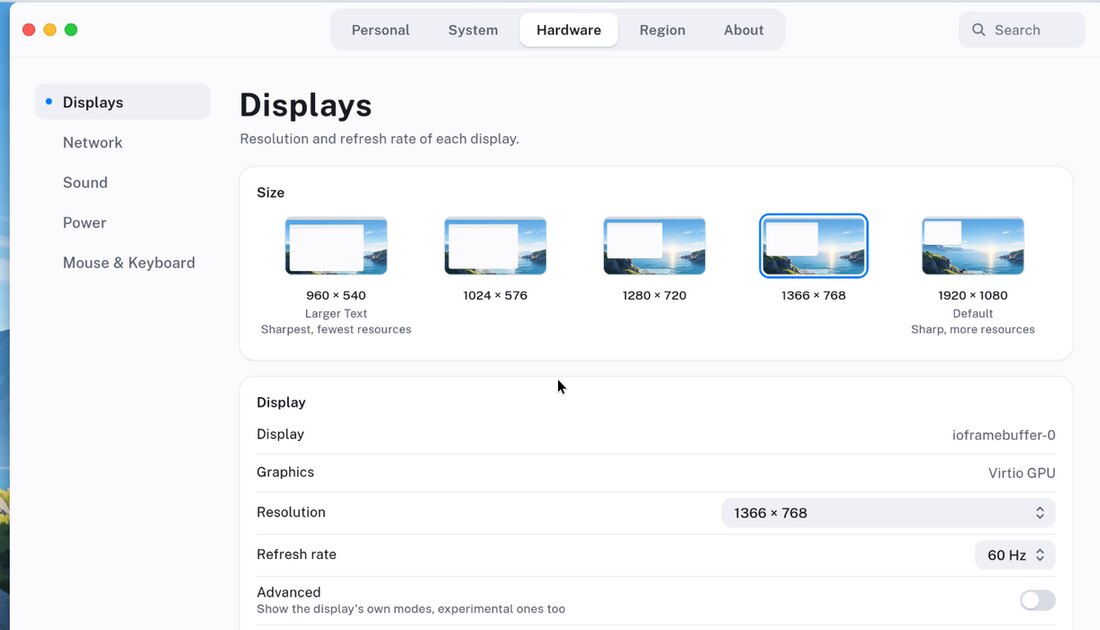
RefyOS now scales the desktop the way a Mac does. In Settings › Displays you choose a size by what it looks like, from larger text to more space, and the system does the rest.
How it works
- Looks like: you pick, say, 1440 × 900. Settings says which size is sharpest and what each one costs to draw.
- Drawn at 2×: apps draw at 2880 × 1800, with @2x icons and full-resolution text.
- Scaled on the GPU: the compositor filters the frame down to the panel's own pixels.
Text and icons stay crisp at every size, not only at exactly twice the panel's resolution.
Every display its own
Each display keeps its own scale. A window draws at the scale of the screen it is on, so a sharp laptop panel and an ordinary monitor work side by side, each with its own menu bar. Cursors are drawn at the display's scale too.